Understanding Projects
Projects are how you organize your mapping work. They can be used for solo mapping or for collaboration with a team.
When you first open CoMapeo, can begin collecting observations in your own project right away. you can edit its name and description to help you stay organized.
A project includes:
-
Project info: Name, description and color
-
Team: list of colaborators
-
Gathered information: Tracks and observations with associated media and metadata.
-
Project settings: As seen in Coordinator Tools; current category set, Remote archive settings etc.
Personal vs Collaborative Projects
A personal Project is automatically set up in CoMapeo when you first onboard. The Project Name is the set to match the Device Name initially. It can be changed any time.
Collaborative projects are ones were people work as a team using CoMapeo to share project data. Exchange is the feature that makes it possible to gather and share data as a team, even when offline
Go to 🔗 Understanding How Exchange Works Go to 🔗 Selecting Device Roles and Teams to learn about making your project collaborative
Multiple Projects
CoMapeo offers people the ability to work on multiple mapping and monitoring projects on a single device. This is useful for differentiating the type on information being gathered and working in different teams.
Use CoMapeo securely with Multiple Projects.
CoMapeo is engineered to keep data safe and organized, even when using a single device for more than one project
Data does not transfer between projects, and will not get mixed or modified if multiple projects are being used on any devices.
Since v5 released in October 2025, CoMapeo supports multiple projects on the same device without losing data
Switching Projects
Data collection can only happen in one project at a time.
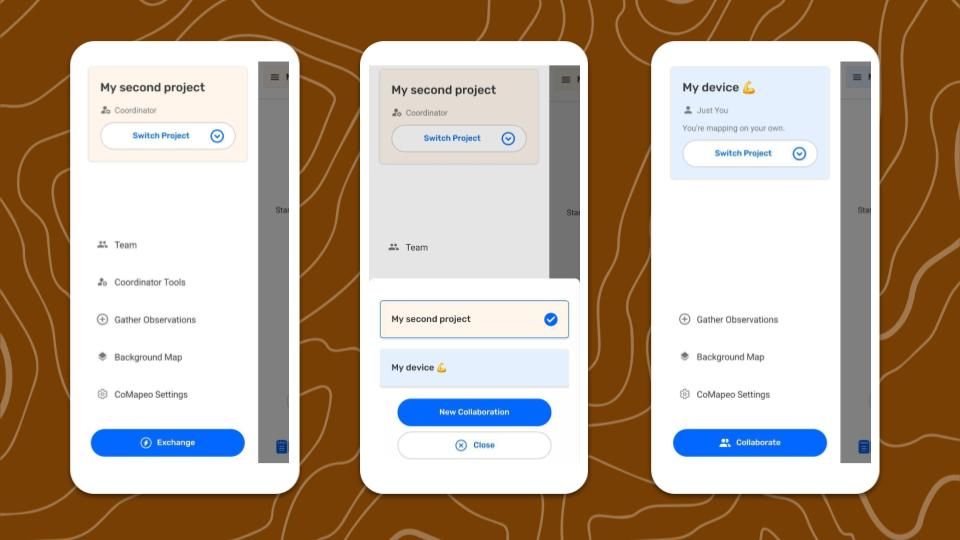
Step By Step
Step 1: Open the  Main Menu
Step 2: Select  Switch project.
Step 3: Open the desired project
Related Content
Go to 🔗 Planning and Preparing for a Project
Go to 🔗 Selecting Device Roles and Teams to learn about making your project collaborative
Go to 🔗 Creating a New Project